
Amazon Hub
Amazon Mobile LLCBusiness
3.384.00 Reviews
- Version
- 0.6-633-prod
- Installs
- 100.00K
- Age Rating
- Everyone
Screenshots

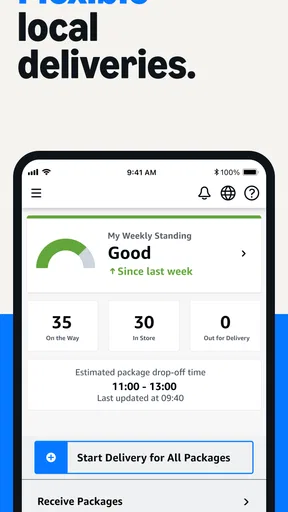

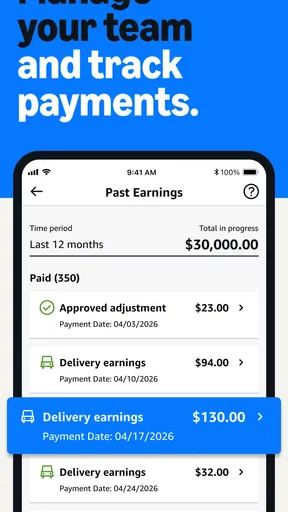
Our Review of Amazon Hub
 Analysis by Appyee
When a business handles Amazon Hub Delivery, pickup, or return activity, the main challenge is not finding another general business app. It is keeping these particular handoff tasks organized without forcing staff to work through unrelated tools. I spent time looking at Amazon Hub as a practical work companion, and my impression is fairly clear: it is most useful when your daily routine already revolves around Amazon Hub operations, while it is a poor fit for a company searching for a complete inventory, sales, or customer-management system.
The app is free, available for users aged Everyone, and comes from Amazon Mobile LLC. It belongs in the business category rather than the consumer shopping category, which matters because its purpose is operational. You are not using it to browse products or place ordinary orders. You are using it to support the movement of parcels through a participating business location or delivery workflow.
Its store rating sits at 3.3 from around 884 ratings, with roughly 84 written reviews and more than 100K installs. Those figures suggest a product with a real working audience but also a mixed experience. I would not treat the rating as a final verdict. For a narrowly focused operations tool, the more useful question is whether its workflow matches the way your business receives, stores, hands over, or returns packages.
How I would decide whether Amazon Hub belongs in a business workflow
I would begin with the task, not the app name. If your staff need a focused way to support Hub Delivery, pickup, and return operations, this app has a logical place in the process. If you need accounting, staff scheduling, stock control, customer relationship management, or a broad delivery platform, you should look at a different category of software instead.
That distinction prevents a common mistake. A business app can be useful without being a complete business-management suite. Amazon Hub is specialized. Its value comes from helping a location or operation perform Amazon-related parcel work, not from replacing every digital tool used by a shop, office, reception desk, or warehouse.
In my view, the most important decision criteria are the number of daily handoffs, the number of people who may need to use the workflow, the reliability of the phone or tablet available at the counter, and how costly a missed or delayed parcel action would be. A small location with occasional activity may find the app easy to justify. A busy operation may need additional procedures around it so that the app is not expected to solve staffing and storage problems on its own.
There is also a human factor. Parcel handling often happens while someone is serving a customer, answering a phone, or managing another delivery. A focused app can reduce the temptation to use notes, spreadsheets, or memory, but only if employees are trained to complete each step consistently. I would make the workflow part of the opening or shift-change routine rather than leaving it to personal preference.
What the app is actually suited to
The clearest use case is a business that participates in Amazon Hub activity and needs a mobile point of control for delivery, pickup, and return work. That could include a location where parcels are received for customers, a business involved in Hub Delivery activity, or a team that needs to process returns as part of its normal service.
For a small shop, the practical benefit is concentration. Instead of treating every parcel as an informal favor, staff can use the dedicated Amazon Hub workflow as the place to manage the task. That can make responsibilities easier to explain: the employee handling the parcel knows which work belongs in the Hub process, while sales and other store duties remain separate.
For a larger team, the app is better viewed as one operational layer rather than the whole system. I would pair it with a simple internal rule about who checks incoming activity, where parcels are placed, and when unresolved items are escalated. The app may support the digital action, but it cannot by itself create a safe storage layout or decide who is accountable during a crowded shift.
Where Amazon Hub has a practical advantage
The strongest advantage is focus. A general delivery app may support many carriers, routes, or business processes, but that breadth can also create extra screens and choices. Amazon Hub is aimed at a specific Amazon-related workflow, so a participating business does not have to bend a generic tool around a specialized responsibility.
I also see value in separating parcel operations from ordinary shopping activity. Amazon’s consumer apps are designed for customers buying and tracking their own orders. This app is intended for the business side of Hub activity. That difference makes it a more sensible starting point for staff than trying to manage a work counter through a consumer-facing application.
Another useful strength is the possibility of making a repeatable handoff routine. In a realistic example, imagine a neighborhood store receiving parcels during a busy afternoon. One employee is serving customers while another handles the Hub task. The second employee can treat the app as the dedicated workspace, complete the operational action, and then return to the counter without mixing the parcel job with the store’s sales records. The important gain is not a flashy feature; it is a clearer division of work.
My first non-obvious tip is to use the app alongside a physical location code or shelf convention, even if that convention is only for staff. A digital confirmation does not tell a new employee where a parcel sits in a crowded back room. Labeling shelves by arrival period or internal zone can reduce searching time and lower the chance of handing over the wrong package. The app supports the transaction; the storage system supports the physical reality.
A second tip is to make exception handling visible. If a parcel cannot be processed immediately, do not rely on a verbal promise that someone will remember it. Keep a short internal queue outside the app for issues such as a busy counter, a misplaced item, or a handoff that needs a supervisor. That is not a replacement for the app. It is a safety net for the moments when real work interrupts the normal path.
Limitations that affect the buying decision
The focused design can also feel restrictive. A business that wants one application for all deliveries, multiple carriers, inventory, billing, and customer records will probably find Amazon Hub too narrow. Installing it does not remove the need for those other systems, because its purpose is tied to Hub Delivery, pickup, and return operations.
The mixed rating is another reason to test the workflow with the people who will actually use it. A manager may understand the concept immediately, while a part-time employee may struggle if the process is introduced during a rush. I would run a short trial during normal operating hours and include the least technical staff member in that test. The goal is to discover whether the workflow remains clear when the counter is busy, not merely whether the app opens successfully.
Device readiness matters too. The current version is 0.6-633-prod and the minimum operating system is Android 7.0. That makes the app accessible to some older Android devices, but businesses should still choose a phone or tablet that employees can comfortably use throughout a shift. A device that is technically compatible but slow, damaged, or shared without a charging routine can turn a simple parcel action into a repeated source of friction.
I would also avoid assuming that the app replaces communication. When several employees share responsibility, they still need a clear agreement about who checks activity, who handles customer-facing handoffs, and who resolves an exception. A specialized app can make the official workflow more consistent, but it cannot compensate for unclear ownership between shifts.
How it compares with the usual alternatives
The most obvious alternative is a general delivery-management platform. That kind of tool may be preferable for a company coordinating several carriers or managing its own routes. Its wider scope can be valuable when the business needs dispatch planning, driver oversight, or a single view across different delivery services. The trade-off is that a general platform may require more setup and may not feel as direct for Amazon Hub-specific work.
A second alternative is a spreadsheet or shared note. For a very small location with occasional parcels, that approach can look attractive because everyone already knows how to edit a list. I would be cautious, though. A spreadsheet can record that something happened, but it is easy to create duplicate entries, overwrite information, or leave a parcel marked incorrectly after a shift change. It may be acceptable as an internal backup, but I would not make it the primary method when the business is formally participating in Hub operations.
Another option is a broad point-of-sale or inventory system with custom notes. This can work when parcel handling is only a minor part of a store’s activity and the team already lives inside that system. However, adding parcel tasks to sales software can blur two different responsibilities. A checkout system is built around purchases and stock; a Hub workflow is built around delivery, pickup, and return activity. Amazon Hub is the better conceptual fit when that parcel work deserves its own process.
For a business that handles several logistics partners, a multi-carrier tool may be better. It can offer a unified operational view, at least in principle, and reduce the need to switch between carrier-specific workflows. But that convenience comes with a decision: do you value one broad dashboard more than a focused Amazon Hub process? If most of your activity is Amazon Hub-related, the specialized option may be easier for staff to learn. If Amazon is only one small part of a complex logistics operation, the broader category deserves closer attention.
My third practical insight is that the best comparison is not based on the number of buttons. Compare the time needed to recover from an interruption. Ask an employee to begin a parcel task, pause to serve a customer, and return to it later. Then repeat the exercise with the alternative. The tool that keeps the work understandable after a disruption may be more valuable than the one with the longest feature list.
What switching really costs
Because the app is free, the direct purchase decision is simple. The real cost is operational change: teaching staff, adjusting opening and closing routines, deciding where parcels are stored, and checking that everyone follows the same process. Even a free app can be expensive if it creates confusion during peak periods.
I would introduce it in stages. First, choose one person to map the current parcel routine from arrival through pickup or return. Next, identify where staff currently use memory, paper, or informal messages. Then introduce the app at the point where the official Hub action should happen. Finally, review the first few shifts for repeated mistakes or delays rather than judging the tool after one quick login.
This staged approach also answers a question many managers have: does every employee need to become an expert? Probably not. The team needs a shared basic routine, while one or two people can become the escalation points for unusual cases. That keeps training manageable and avoids making the entire operation dependent on a single employee who happens to know the process best.
I would also keep a written internal checklist for the physical side of the work. It might cover where new parcels go, how staff identify items awaiting pickup, and what to do when the counter becomes too busy. The checklist should not duplicate every screen in the app. Its purpose is to cover the gaps between digital action and real-world handling.
Who should use it, and who should skip it
I would recommend Amazon Hub to a business already involved in Amazon Hub Delivery, pickup, or return activity and looking for a dedicated mobile workflow. It is especially sensible when staff need to distinguish parcel duties from sales or reception work, and when the business prefers a focused Amazon-oriented process over a broad logistics platform.
I would be more hesitant for a company that does not participate in Hub operations, because the app’s usefulness is tied to that role. I would also point larger logistics teams toward a wider platform if they need multi-carrier coordination, route planning, warehouse control, or detailed business reporting. Those needs go beyond what I would expect from a focused Hub operations app.
For a business deciding between this and a spreadsheet, my recommendation depends on volume and accountability. Occasional informal parcel storage may not justify changing habits. Regular customer pickups and returns are a different matter: the cost of an unclear handoff can quickly outweigh the convenience of an improvised list. In that situation, a dedicated workflow is the more responsible choice.
One question users often have is whether the app is suitable for personal parcel tracking. I would not choose it for that purpose. Its role is business operations connected with Amazon Hub, so a consumer-facing Amazon experience is more appropriate for an individual managing personal orders.
Another question is whether the app should be installed on every available phone. I would avoid that approach. A controlled set of work devices is easier to charge, maintain, and keep consistent. If staff use personal phones without a clear company policy, the business may create avoidable confusion about access, responsibility, and shift handover.
Users may also wonder whether a free app means there is no implementation work. My experience with focused operational tools suggests the opposite: the download is the easy part. The useful result comes from pairing the app with a storage layout, a handoff rule, and an exception process. Without those pieces, staff may still improvise around the software.
Finally, the version and operating-system requirements deserve a quick check before rollout. The app is free, runs on Android devices using Android 7.0 or later, and is currently identified as version 0.6-633-prod. I would verify the business device before a busy launch day and keep the app updated through the normal device-maintenance routine. That small preparation is more sensible than discovering a compatibility problem while customers are waiting.
My recommendation after weighing the trade-offs
Amazon Hub is a focused operational tool, not an all-purpose business platform. That is both its main strength and its clearest boundary. I like it for businesses whose work genuinely includes Amazon Hub Delivery, pickup, or return handling and who want a dedicated place for those tasks. I would not recommend it as a substitute for a complete logistics, inventory, or customer-service system.
The 3.3 average tells me to approach it with practical expectations rather than automatic enthusiasm. Test it with real staff, during a real shift, and pay attention to interruptions, handoffs, and exception cases. If the workflow fits, the app can bring useful structure to a task that is otherwise easy to manage informally and inconsistently.
My final advice is simple: choose Amazon Hub when specialization is what you need. Choose a broader alternative when your business must coordinate many carriers or connect parcel work with wider operations. For the right business, the free download and focused purpose make it worth trying; for the wrong one, installing it will only add another narrow tool to an already crowded workflow.
Verdict
Strengths of Amazon Hub
- Convenient package pickup and returns at participating Amazon Hub locations.
- Reduces missed deliveries when you are away from home.
- Pickup locations can offer extended access hours.
- Useful for customers without a secure delivery address.
- Package notifications make collection deadlines easier to track.
Limitations of Amazon Hub
- Availability depends on nearby participating Hub locations.
- Some locations may have limited storage capacity during busy periods.
- Packages must usually be collected within a specified time.
- Large or restricted items may not qualify for Hub delivery.
- Access can be inconvenient if the location is far from home.
Other Releases by Amazon Mobile LLC
View All
MX Player
Video Players & Editors4.2

Amazon Shopping
Shopping4.4

Prime Video
Entertainment4.7

Prime Video
Entertainment3.1
Similar Picks in This Category
View All
LinkedIn: Community & Network
LinkedIn3.8

Zoom Workplace
zoom.com4.1

Microsoft Teams
Microsoft Corporation4.6

Meta Business Suite
Meta Platforms, Inc.4.6

Webex Meetings
Cisco Systems, Inc.4.5

TeamViewer Remote Control
TeamViewer4.4
Frequently Asked Questions
What is Amazon Hub, and what is it used for?
Amazon Hub is a delivery and pickup service that allows customers to receive Amazon orders at secure, designated locations instead of having packages delivered directly to their homes. Depending on availability, these locations may include apartment lockers, staffed counters, convenience stores, or other partner sites. It can be especially useful for people who are frequently away from home or want to reduce the risk of missed or unattended deliveries.
How do I choose an Amazon Hub location for my order?
During Amazon checkout, enter or select a delivery address and look for the option to deliver to an Amazon Hub or pickup location. Available locations depend on your area, the item being purchased, package size, seller, and delivery method. After selecting a location, review its address, opening hours, and pickup instructions carefully before placing the order, since not every product is eligible for every Hub location.
How do I collect a package from Amazon Hub?
The pickup process depends on the type of Amazon Hub location. Locker deliveries commonly require a pickup code, barcode, or account-linked access method, while staffed locations may ask for identification or the notification details sent by Amazon. Once the package is ready, follow the instructions in the delivery notification and collect it within the stated holding period. If you cannot find the code, check your Amazon messages or contact customer support.
How long will Amazon Hub keep my package, and what happens if I miss the deadline?
Amazon Hub locations generally hold packages for a limited period, but the exact deadline can vary according to the location and delivery instructions. You should check the notification or order details for the final pickup date rather than assuming every Hub follows the same policy. If the package is not collected in time, it may be returned to Amazon and a refund or replacement process may begin according to the order’s eligibility and return terms.
Is Amazon Hub safe, free, and available for every Amazon order?
Amazon Hub is designed to provide a more secure alternative to leaving packages outside a residence, but availability is not guaranteed for every order. Some products may be excluded because of their size, weight, seller, delivery restrictions, or special handling requirements. Fees can also depend on the selected service and your Amazon membership or location. Always review the final checkout total, pickup requirements, and delivery eligibility before confirming the purchase.
